Connect your AI
ai tags

Adspy AI tags: filter ads by hook, format, angle and offer

Adspy AI tags are labels an AI model writes for each analysed ad, in 23 categories such as hook tactic, visual format, messaging angle and offer type. Choose up to 20 tags and Adspy keeps only the ads that carry all of them.
Categories
23 categories419 listed values
Per creative
Up to 31 attributesRecorded with each creative's analysis
Matching
Every selected tagUp to 20 tags at once
Used by
Search and Brand X-RayAlso similar ads
Connect your AISee pricing

Updated

Glossier video ad on Meta

Strategy

  • Narrative Framework: FAB
  • Messaging Angle: Benefit-Led
  • Hook Tactic: Product Reveal
  • Pain Point Category: None
  • Offer Type: No Offer

Audience

  • Intended Audience: Millennial Women
  • Seasonality: Summer
  • Language: English
  • Industry: Beauty
  • Funnel Stage: Consideration

Format

  • Asset Type: Branded Production
  • Visual Format: Talking Head
  • Video Pacing: Medium Pace
  • Scene Density: Single Scene
  • Video Duration: 31-60s
  • Aspect Ratio: 9:16
  • Ad Format: Story Ad

Tone & style

  • Emotional Tone: Friendly
  • Tone Formality: Informal You
  • Color Palette: Pink Feminine
  • Setting: Studio
  • Branding Intensity: Moderate

Conversion

  • CTA Type: Shop Now
  • Cta Position: Opening and Closing
  • Product Visibility: Throughout

Talent & audio

  • Audio Type: On-Camera Speech
  • Text Overlay Style: Bold Captions
  • Talent: Model

Social proof

  • Social Proof Type: None
  • Proof Specificity: Vague Claim
  • Proof Position: None
A Glossier video ad on Meta, first recorded on 10 July 2026, with the 31 AI tags recorded for it, grouped by theme. Tags are model output. From a snapshot of the shared library taken on 23 September 2026.

Which categories do Adspy AI tags cover?

Adspy's AI tag taxonomy has 23 categories and 419 listed values, from how an ad was produced and how it opens to its offer, call to action and setting. Every category is below with its definition and each value it can take; all of them work as search filters.

Asset Type19 values

The broad production style or origin of the creative.

  • UGC
  • UGC Mashup
  • Branded Production
  • Lo-Fi
  • Studio Shot
  • Lifestyle Photography
  • Stock Footage
  • Motion Graphics
  • Animation
  • 3D Render
  • Screen Recording
  • AI-Generated
  • Illustration
  • Product Photography
  • User Screenshot
  • Meme
  • Stop Motion
  • Cinemagraph
  • Mixed Media

Visual Format35 values

The specific visual execution style and layout.

  • Talking Head
  • Talking in Car
  • Testimonial
  • Unboxing
  • Before After
  • Split Screen
  • Green Screen
  • POV
  • Voiceover B-Roll
  • Listicle
  • Tutorial
  • Demo
  • Vlog
  • Skit
  • Interview
  • Founder Story
  • Behind the Scenes
  • Montage
  • Reaction
  • Duet
  • ASMR
  • Text Overlay on Footage
  • Whiteboard Explainer
  • Carousel
  • Single Image
  • Flat Lay
  • Infographic
  • Quote Card
  • Collage
  • Product Closeup
  • Countdown Reveal
  • Timelapse
  • Street Interview
  • Challenge
  • Slideshow

Messaging Angle35 values

The core narrative or persuasion framework.

  • Problem Solution
  • Feature Highlight
  • Benefit-Led
  • Health Benefits
  • Convenience
  • Cost Savings
  • Ingredient Spotlight
  • Science-Backed
  • Social Proof
  • Expert Endorsement
  • Competitor Comparison
  • Old Way vs New Way
  • Transformation
  • Risk Reversal
  • FOMO
  • Aspirational Lifestyle
  • Community
  • Sustainability
  • Origin Story
  • Brand Mission
  • Founder's Why
  • Educational
  • Myth Busting
  • Hot Take
  • Emotional Story
  • Humor
  • Nostalgia
  • Luxury Positioning
  • Scarcity
  • New Launch
  • Partnership
  • Press Mention
  • Award Highlight
  • Clean Label
  • Personalization

Hook Tactic32 values

The technique used early to stop the scroll.

  • Question
  • Bold Claim
  • Contrarian
  • Curiosity Gap
  • If Then
  • Statistic
  • Confession
  • Pattern Interrupt
  • ASMR Sensory
  • Satisfying Visual
  • Before After Tease
  • Demographic Call-Out
  • Pain Point Call-Out
  • Social Proof Lead
  • Expose
  • Journey
  • Give Me X Minutes
  • POV Statement
  • Why Did No One Tell Me
  • Unpopular Opinion
  • Ranking
  • Challenge
  • Emotional Lead
  • Trending Sound
  • Silent Text Hook
  • Product Reveal
  • Founder Address
  • Urgency
  • Debate Starter
  • Relatable Situation
  • Humor Opening
  • Direct Benefit

Intended Audience27 values

The persona or demographic the creative is designed to reach.

  • Gen Z Women
  • Gen Z Men
  • Millennial Women
  • Millennial Men
  • Gen X
  • Boomers
  • New Parents
  • Parents of Teens
  • Active Males
  • Active Females
  • Fitness Enthusiasts
  • Wellness Seekers
  • Beauty Enthusiasts
  • Gamers
  • Pet Owners
  • Foodies
  • Budget Shoppers
  • Luxury Buyers
  • Students
  • Entrepreneurs
  • Marketers
  • Small Business Owners
  • Enterprise Decision Makers
  • Tech Early Adopters
  • Eco-Conscious
  • Travelers
  • Broad Audience

Seasonality26 values

The seasonal or event context in the creative.

  • Evergreen
  • New Year
  • Wellness January
  • Valentine's Day
  • Spring
  • Easter
  • Ramadan
  • Mother's Day
  • Father's Day
  • Summer
  • Back to School
  • Fall
  • Halloween
  • Singles Day
  • Black Friday
  • Cyber Monday
  • Christmas
  • Holiday Season
  • Gift Guide
  • Prime Day
  • Summer Sale
  • Winter Sale
  • French Days
  • Fashion Week
  • Product Launch
  • Brand Anniversary

Offer Type23 values

The promotional incentive present in the creative.

  • No Offer
  • Percentage Off
  • Fixed Amount Off
  • First Order Discount
  • Free Shipping
  • Free Trial
  • Freemium
  • BOGO
  • Bundle Deal
  • Subscribe and Save
  • Money-Back Guarantee
  • Free Gift
  • Exclusive Access
  • Limited Time
  • Flash Sale
  • Referral Code
  • Loyalty Program
  • Price Anchor
  • Payment Plan
  • Free Consultation
  • Waitlist
  • Coupon Code
  • Clearance

CTA Type20 values

The call-to-action used in the creative.

  • Shop Now
  • Learn More
  • Sign Up
  • Try Free
  • Get Offer
  • Book Now
  • Download
  • Subscribe
  • Watch More
  • Swipe Up
  • Link in Bio
  • Comment
  • Send Message
  • Install App
  • Order Now
  • Add to Cart
  • Join Waitlist
  • Get Quote
  • Soft CTA
  • No CTA

Emotional Tone20 values

The dominant emotion or mood conveyed by the creative.

  • Excitement
  • Urgency
  • Trust
  • Humor
  • Empathy
  • Inspirational
  • Calm
  • Edgy
  • Nostalgic
  • Educational
  • Luxurious
  • Friendly
  • Provocative
  • Raw
  • Empowering
  • Scientific
  • Minimal
  • Warm
  • Mysterious
  • Serious

Audio Type14 values

The audio strategy used in the creative.

  • Professional Voiceover
  • Casual Voiceover
  • On-Camera Speech
  • Trending Sound
  • Original Music
  • Licensed Music
  • ASMR
  • Sound Effects
  • AI Voice
  • Text-to-Speech
  • Silent
  • Voice and Music Mix
  • Podcast Clip
  • Customer Testimonial Audio

Text Overlay Style13 values

How on-screen text is presented.

  • No Text Overlay
  • Bold Captions
  • Kinetic Typography
  • Static Title
  • Handwritten
  • Native Captions
  • Headline Subheadline
  • Full-Screen Text
  • Lower Third
  • Minimal Text
  • Bullet Points
  • Price Badge
  • Meme Text

Color Palette16 values

The dominant color scheme of the creative.

  • Bright Vibrant
  • Pastel
  • Dark Moody
  • Monochrome
  • Neutral Earthy
  • Neon
  • Warm Tones
  • Cool Tones
  • White Clean
  • Brand Colors
  • High Contrast
  • Gradient
  • Natural Outdoor
  • Gold Luxury
  • Pink Feminine
  • Colorful Mixed

Talent17 values

Who appears on screen or whose voice is featured.

  • No Talent
  • Founder
  • Employee
  • UGC Creator
  • Micro-Influencer
  • Macro-Influencer
  • Celebrity
  • Real Customer
  • Expert
  • Model
  • Child
  • Family
  • Pet
  • AI Avatar
  • Hands Only
  • Group
  • Anonymous

Product Visibility12 values

How and when the product is shown.

  • Hero Shot
  • Product in Use
  • Delayed Reveal
  • First 3 Seconds
  • Throughout
  • Packaging Closeup
  • Background Element
  • No Product Shown
  • Side by Side Comparison
  • Before After
  • App UI Shown
  • Logo Only

Video Pacing7 values

The editing speed and rhythm.

  • Fast Cuts
  • Medium Pace
  • Slow Cinematic
  • Dynamic Mixed
  • Single Take
  • Jump Cut Heavy
  • Rapid Montage

Video Duration5 values

The length bucket of the video.

  • Under 6s
  • 6-15s
  • 16-30s
  • 31-60s
  • Over 60s

Aspect Ratio6 values

The aspect ratio of the creative.

  • 1:1
  • 4:5
  • 9:16
  • 16:9
  • 1.91:1
  • 2:3

Ad Format16 values

The platform ad unit type.

  • Single Image
  • Single Video
  • Carousel Image
  • Carousel Video
  • Carousel Mixed
  • Collection Ad
  • Instant Experience
  • Dynamic Product Ad
  • Story Ad
  • Reels Ad
  • Spark Ad
  • In-Feed Native
  • Display Banner
  • Shopping Ad
  • Lead Form Ad
  • App Install Ad

Industry33 values

The industry or product category of the advertiser.

  • Beauty
  • Skincare
  • Fashion
  • Health
  • Wellness
  • Fitness
  • Food
  • Beverage
  • Supplements
  • Home
  • Pet Care
  • Baby
  • Tech
  • Electronics
  • SaaS
  • Finance
  • Insurance
  • Real Estate
  • Education
  • Travel
  • Automotive
  • Gaming
  • Entertainment
  • Luxury
  • Jewelry
  • CPG
  • DTC eCommerce
  • B2B Services
  • Healthcare
  • Non-Profit
  • Legal
  • Crypto
  • Energy

Funnel Stage6 values

Where in the buyer journey this creative operates.

  • Awareness
  • Consideration
  • Conversion
  • Retention
  • Winback
  • Full-Funnel

Social Proof Type14 values

The form of social proof present, if any.

  • None
  • Star Rating
  • Written Review
  • Video Testimonial
  • Customer Count
  • Influencer Endorsement
  • Expert Endorsement
  • Press Mention
  • UGC Repost
  • Award
  • Certification
  • Before After Results
  • Trust Badge
  • Community Reference

Setting18 values

The environment or backdrop.

  • Home
  • Kitchen
  • Bathroom
  • Bedroom
  • Office
  • Gym
  • Outdoor
  • Urban
  • Beach
  • Car
  • Studio
  • Restaurant
  • Store
  • Clinical
  • Abstract Background
  • Event
  • Travel Destination
  • Pure Graphic

Branding Intensity5 values

How prominently the brand identity appears.

  • Heavy
  • Moderate
  • Light
  • None
  • Co-Branded

Also recorded on creatives

Creative DNA also shows 8 attributes that are not in the filter list: narrative framework, pain point category, language, scene density, tone formality, call-to-action position, proof specificity, proof position. The filter offers them when they appear in your current results.

How do several AI tags narrow a search?

Adspy combines AI tags with AND: an ad must carry every selected tag to stay in the results. Of a sample of 80 ads from the shared library, 37 carry a benefit-led angle and 19 open with a product reveal. 14 carry both, and adding "product shown throughout" leaves 2.
  1. messaging_angle:Benefit-Led37of 80 ads
  2. + hook_tactic:Product Reveal14carry both
  3. + product_visibility:Throughout2carry all three
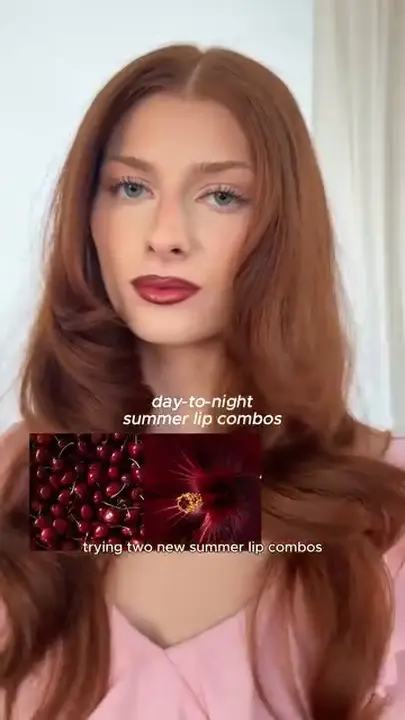
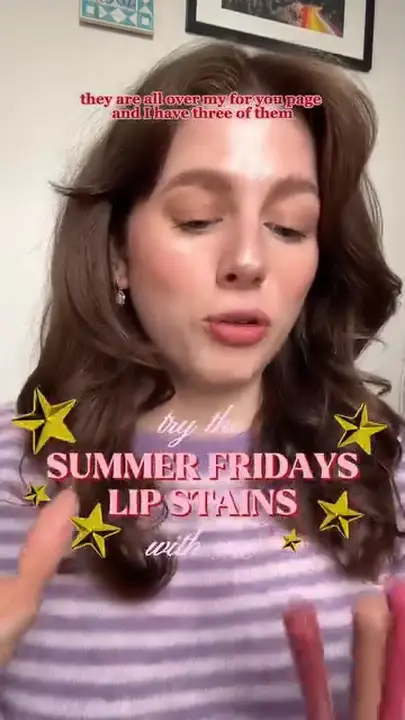
Glossier ad carrying all three tags
Glossier
Summer Fridays ad carrying all three tags
Summer Fridays

How does Adspy find similar ads with AI tags?

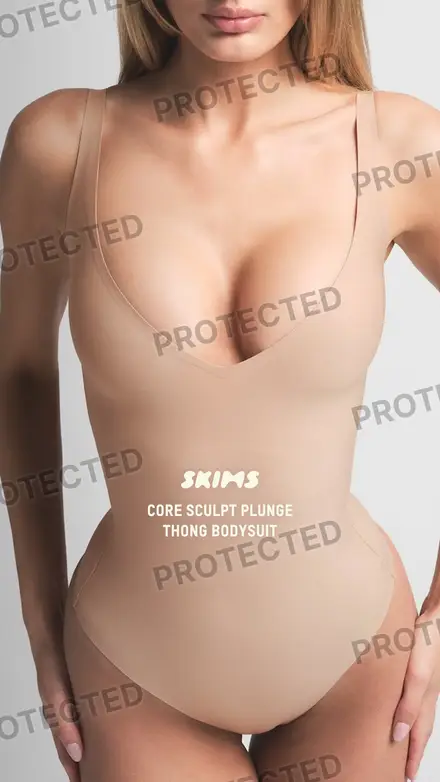
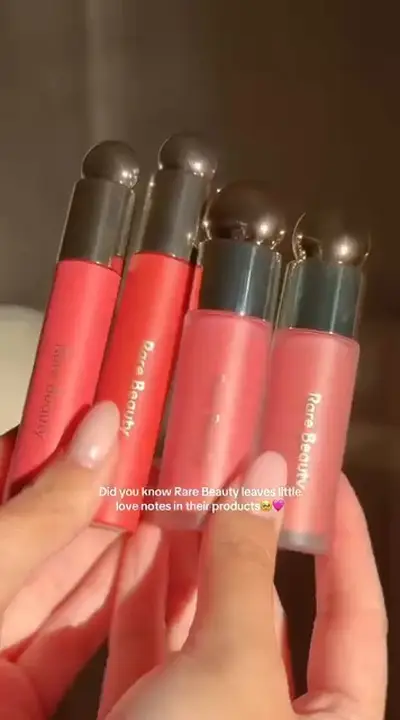
Adspy's similar ads compare the specific AI tags of one creative with other brands' creatives. A match needs at least two shared categories, one of them about execution such as hook tactic or visual format, and each match lists the tags it shares. The Glossier video above matches a Rare Beauty image on 3 specific tags.

Glossier video ad on Meta
GlossierThe creative you are reading
  1. Rare Beauty image ad on Meta

    Rare BeautySame recorded industry

    • Narrative Framework FAB
    • Hook Tactic Product Reveal
    • Setting Studio
  2. Rare Beauty video ad on Meta

    Rare BeautySame recorded industry

    • Text Overlay Style Bold Captions
    • Product Visibility Throughout
  3. SKIMS image ad on Meta

    SKIMSCreative lookalike

    • Narrative Framework FAB
    • Messaging Angle Benefit-Led
    • Hook Tactic Product Reveal
    • Intended Audience Millennial Women
    • Talent Model
    • Setting Studio

Ranked among the 134 analysed ads of the sample. In the library, Adspy reviews up to 500 candidates and returns up to 24 matches, at most 3 per brand, with industry peers first.

Where do AI tags appear in Adspy?

Adspy uses the same AI tags everywhere a creative appears in your assistant: in each search result, as search filters, in similar ads and in the reports built from many creatives. A tag you notice on one ad can become the filter of the next search.

Search results
Every creative a search returns lists its AI tags, and Claude's research gallery shows up to four on each card.
Search filters
Ask for up to 20 tags from every category; the assistant passes them to search_creatives.
Find matching ads
Ask for ads that carry the same tags as the one you are reading; the assistant searches the library for ads that carry all of them.
Similar ads
Other brands' creatives that share specific tags with the one you are reading.
Brand X-Ray
The share of a brand's creatives in each of 25 tag dimensions, with the ads behind every share.

How to use AI tags in Adspy

Adspy's AI tags filter searches in your AI assistant, Claude, Claude Code, Codex or any remote MCP client, through the Adspy MCP server. Ask for ads by their traits and the assistant passes up to 20 tags to search_creatives, included in your plan, or finds other brands' ads that share a creative's tags.

In your AI assistant

  1. Connect Adspy to your AI assistant once: Claude, Claude Code, Codex or any remote MCP client. The setup guide has the steps for each.
  2. Ask for ads by their traits, for example "Meta ads with a question hook and a free-gift offer". The assistant passes tags such as hook_tactic:Question to search_creatives.
  • search_creatives accepts up to 20 tags; every result lists its own tags.Included
  • find_similar_creatives returns other brands' creatives that share specific tags.Included

What AI tags do not tell you

Model output, not verified fact

An AI model assigns the tags when an ad is analysed. Tags can be wrong or incomplete, and Adspy labels them as AI tags wherever they appear.

Nothing about performance

A tag describes what an ad contains. It does not say whether the ad worked, and Adspy never ranks tags by results.

Only analysed ads carry tags

Tags appear once an ad has been analysed. In an exploratory audit of 611 creatives from 8 brands on 20 September 2026, 558 carried AI tags; coverage varies by brand and source.

Fixed labels

Tags come from a fixed vocabulary, matched exactly. You cannot add your own tags; write your own observations as notes in a collection.

Questions about AI tags

Who writes the AI tags?

An AI model writes them when an ad is analysed in the shared library. Adspy reads the tags and shows them as they were recorded; it does not edit them.

How many tags does one ad have?

It depends on the ad. The Glossier video on this page carries 31. Image ads in the sample carry 27, because categories such as video pacing and video duration apply only to video.

Are there tags outside the 23 categories?

Yes. A creative's analysis also records 8 attributes outside the filter list: narrative framework, pain point category, language, scene density, tone formality, call-to-action position, proof specificity, proof position.

Do tags work on images and videos?

Yes. Both carry tags. Categories that describe motion or sound, such as video pacing, video duration and audio type, appear on video ads.

Why does an ad show no tags?

The ad has not been analysed yet. Adspy returns no tags for it rather than guessing, and the tags appear once the analysis exists.

Sources and method

The categories, definitions and values come from Adspy's tag taxonomy (23 categories, 419 values), the list the search filter offers.

Examples come from a snapshot of the shared library taken on 23 September 2026: a sample of 80 Meta ads for the intersection, and 134 analysed ads as the candidate pool for similar ads (the library itself reviews up to 500 candidates).

The coverage figure comes from an exploratory, non-representative audit of 8 brands in the shared library on 20 September 2026 (611 creatives).

Corrections: info@adspy.sh

Have a brand in mind?

Add Adspy to your assistant with this URL, sign in, and ask about its ads. Connecting takes a few minutes, and no ad account.

Connect your AI
https://www.adspy.sh/mcp